Let an agent animate with you
An agent can build the scene in the studio you have open. You watch it happen, keep working beside it, and undo its whole turn in one step.
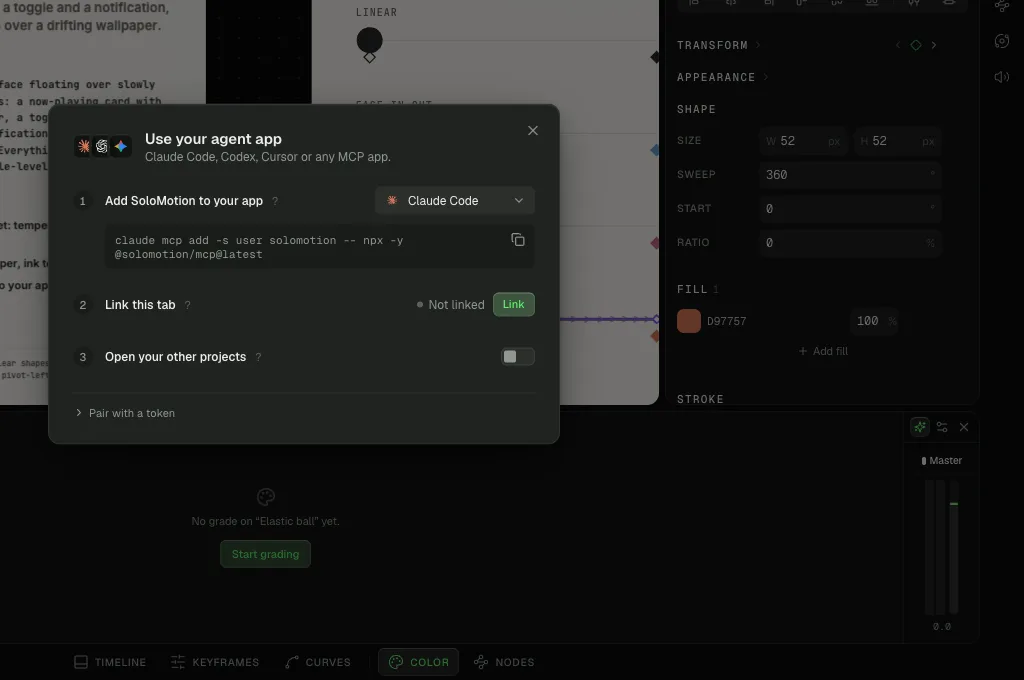
Add the server to your agent
The server is @solomotion/mcp. It runs on your machine over stdio, like any MCP server.
For Claude Code:
claude mcp add -s user solomotion -- npx -y @solomotion/mcp@latestFor any other client that runs a stdio server, add this to its MCP config:
{
  "mcpServers": {
    "solomotion": {
      "command": "npx",
      "args": ["-y", "@solomotion/mcp@latest"]
    }
  }
}
Keep @latest. Without it, npx serves whichever copy it cached first.
Link the studio tab
- Open the studio and click Agents in the left rail.
- Click Use your agent app.
- Under Link this tab, click Link.
The tab stays linked and reconnects whenever your agent starts a session. Several agent sessions can share one link.
Ask for something
Start your agent and describe the result, not the clicks:
Make a 1080×1920 reel: a bold kicker, a two-line title that unblurs word by word, and a lower third with my name. Look at it before you tell me it is done.The agent reads the project with doc_overview, builds with the editor's commands, then checks its own work with view_render and view_frames, which return images it can see.
What it can and cannot touch
- This project. By default an agent works in the project open in the linked tab.
- Your other projects. Only when you turn on Open your other projects in the same dialog.
- One undo step per request, labelled with the agent's name. ⌘CtrlZ undoes your own edits first, so its work and yours never tangle.
- Your machine. It can import files you point it at and write exports to your Downloads folder.
Security
The server listens on 127.0.0.1:7318 only. It trusts a tab by its origin when the tab comes from SoloMotion itself or localhost. Any other origin, such as your own self-hosted build, must pair with the token the server prints when it starts, also kept in ~/.solomotion-mcp. Allow that origin with SOLOMOTION_MCP_ORIGINS:
SOLOMOTION_MCP_ORIGINS=https://studio.example.com npx -y @solomotion/mcp@latestThe built-in agent
The same panel has a chat of its own. Click Connect a model to bring a model provider and key; the built-in agent then uses the same commands as an external one. Neither is required to use the studio.