Render and ship it
Pick a comp, pick a format, press Render. The file is yours: no watermark, no account, no upload.
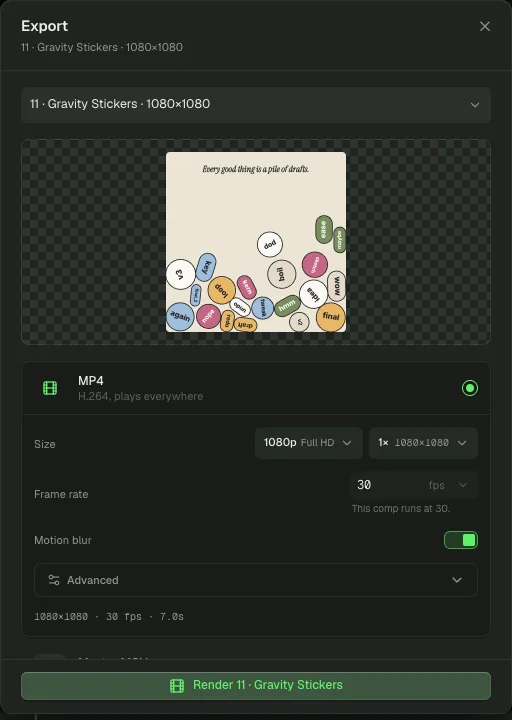
Export a video
- Select the comp, then click Export at the top right. Or choose File › Export video / sequence….
- Check the subject at the top of the dialog: the comp, or the layer or group you selected.
- Pick a format.
- Check Size, Frame rate and Motion blur.
- Click Render.
| Format | For |
|---|---|
| MP4 | H.264. Plays everywhere. |
| Master MOV | Lossless, keeps transparency. For compositing and editing. |
| WebM | Recorded as it plays. |
| GIF | Loops anywhere, 256 colours. |
| PNG sequence | A file per frame, for compositing. |
| PNG | The frame at the playhead. |
| SVG | Vector, media embedded as images. |
| Lottie | Vector motion for web and apps. |
| A page per frame. | |
| 3D model | A world as GLB, USDZ, OBJ, STL, glTF or PLY. Shown when the subject is a 3D world. |
Frame rate starts at the comp's own. A change here applies to this export only.
Choose what part to render
Range picks the span: the layer's span, the whole comp, or the working range you set with [ and ]. Export a selected layer or group to render only that piece.
Tune quality and sound
Open Advanced on a video format for Quality (each tier shows its bitrate), Audio bitrate and Level sound, which evens out the mix at the strength you pick. If an export comes back silent, turn on Record sound: it renders in real time and captures exactly what you hear.
Save the project
Press ⌘CtrlS or choose File › Save project. The project saves as a .motion bundle with its media inside, so it opens on any machine. Save project as… picks a new name or place.
Two more entries in the File menu:
- Export selection (.motion) saves only the selected layers, to bring into another project with Import….
- Export document (.json) writes the project data as plain JSON.
Ask an agent
Agents render with export_render (mp4, webm, gif, mov, png-sequence, png or audio). An export is a job; export_wait collects one that is still running and export_cancel stops it. The MCP server writes the file to your Downloads folder unless you name saveTo. project_save writes the .motion bundle.
Export this comp as an MP4 into renders/, export the audio on its own, then save the project beside them.